Rebuild the platform without disrupting the work
Reservation Sales supports hotel reservations teams as they turn phone inquiries into bookings. Revinate's public product page describes a platform for capturing voice leads, following up with guests who have not booked, and connecting calls to marketing attribution and operational reporting.
That makes the agent workspace part of a larger business system. Agents need guest context during a live conversation; supervisors need visibility into team performance; marketing and revenue teams depend on the data those interactions create.
The legacy .NET application was reaching end of life. Replacing its architecture meant carrying forward an extensive set of workflows, configurations, and data dependencies while creating room for a different product experience.
The design challenge: modernize a mission-critical workspace without making experienced agents relearn everything at the expense of the calls they need to handle.
Provide continuity across a three-year rewrite
I was the sole product designer on a three-year, multimillion-dollar initiative, owning the experience end to end across four successive project owners. Engineering partnership and continuity of design intent were central to moving the work forward.
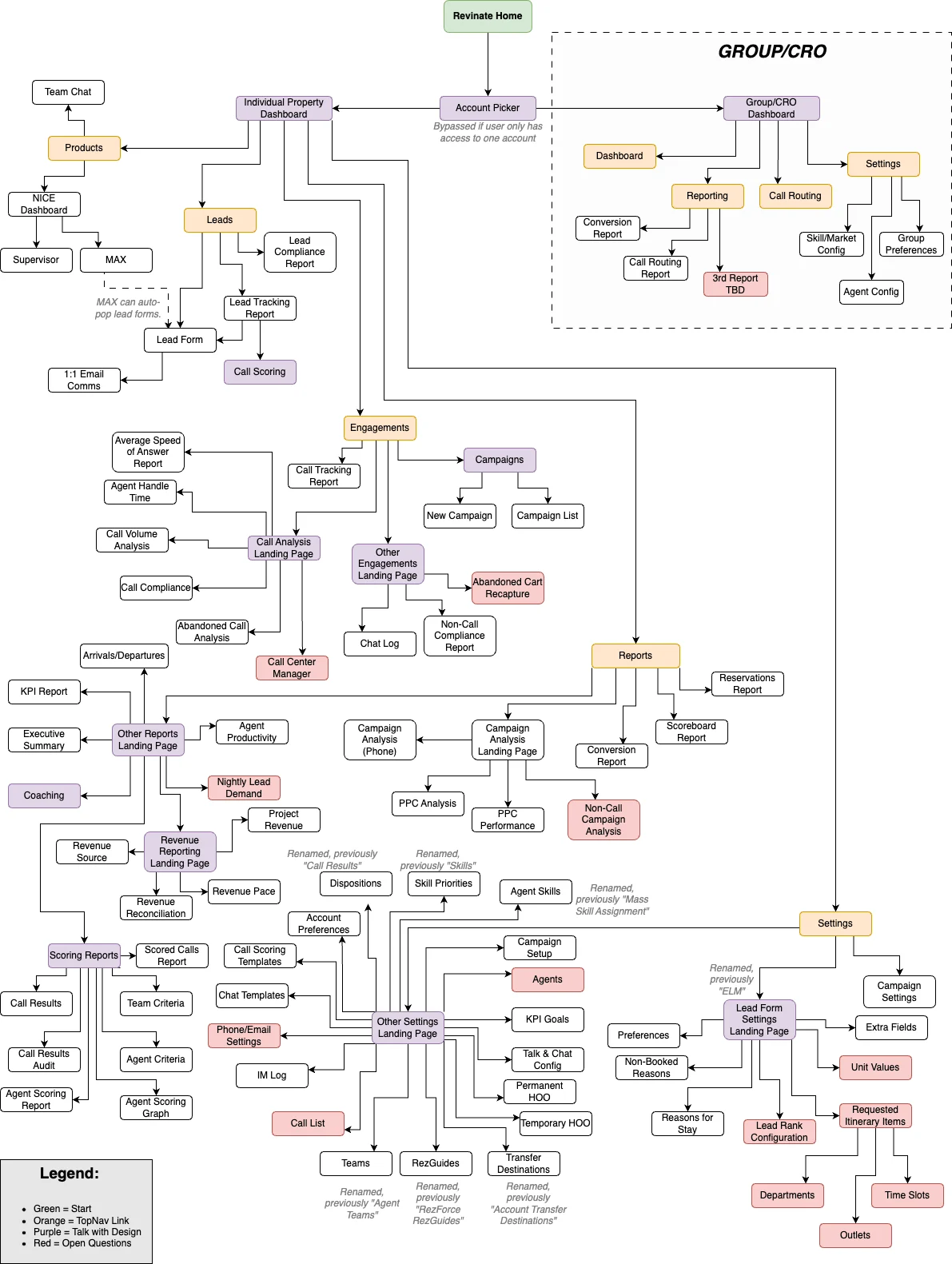
The starting documentation was a high-level navigation and feature map with unresolved areas. My responsibility extended beyond redesigning screens: I had to connect destinations, permissions, settings, and workflows into an experience that could support day-to-day operations.
- Platform experience: organize guest context, reservation details, communications, templates, reporting, and settings around the work agents and supervisors need to do.
- Organizational complexity: connect group hierarchy and permissions with an experience that supports operations beyond a single property.
- New workflows: design AI call review alongside the operational experience agents and supervisors already depended on.
Treat adoption as a design constraint
A cleaner interface would not be enough if it slowed agents down during a call. Experienced users had established ways of finding information and moving through tasks, so the rewrite needed to balance a more coherent structure with flexibility in the workspace.
Organize information around a live conversation
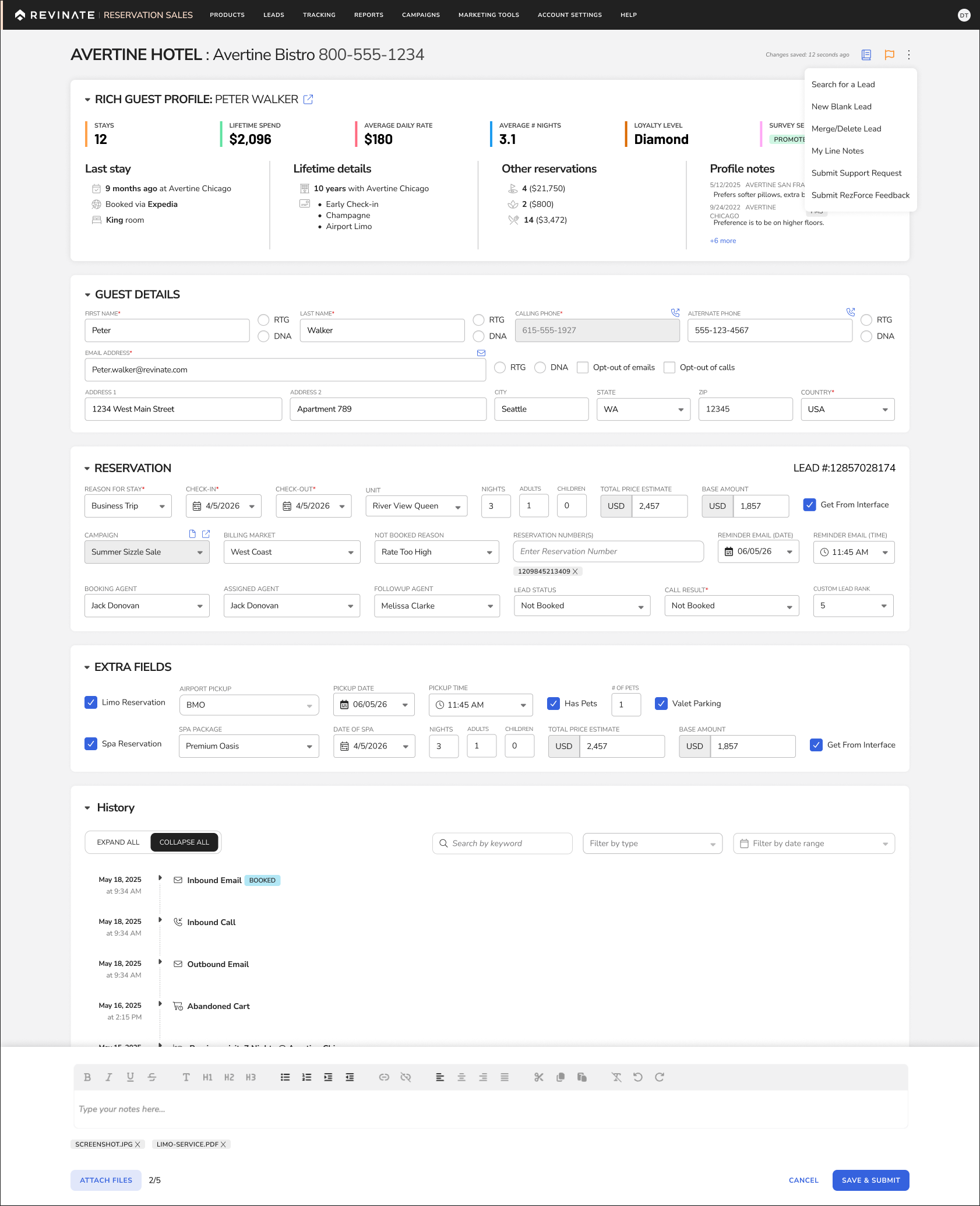
I introduced customizable, saved layouts so agents could arrange guest context, reservation details, and communications around their needs. The design challenge was making that information usable during a call, when an agent needs to find context and keep the conversation moving.
Saved layouts gave agents a way to adapt the workspace to different call and customer types. This connected the platform's information structure to how people actually organize their work.
Make past interactions available in context
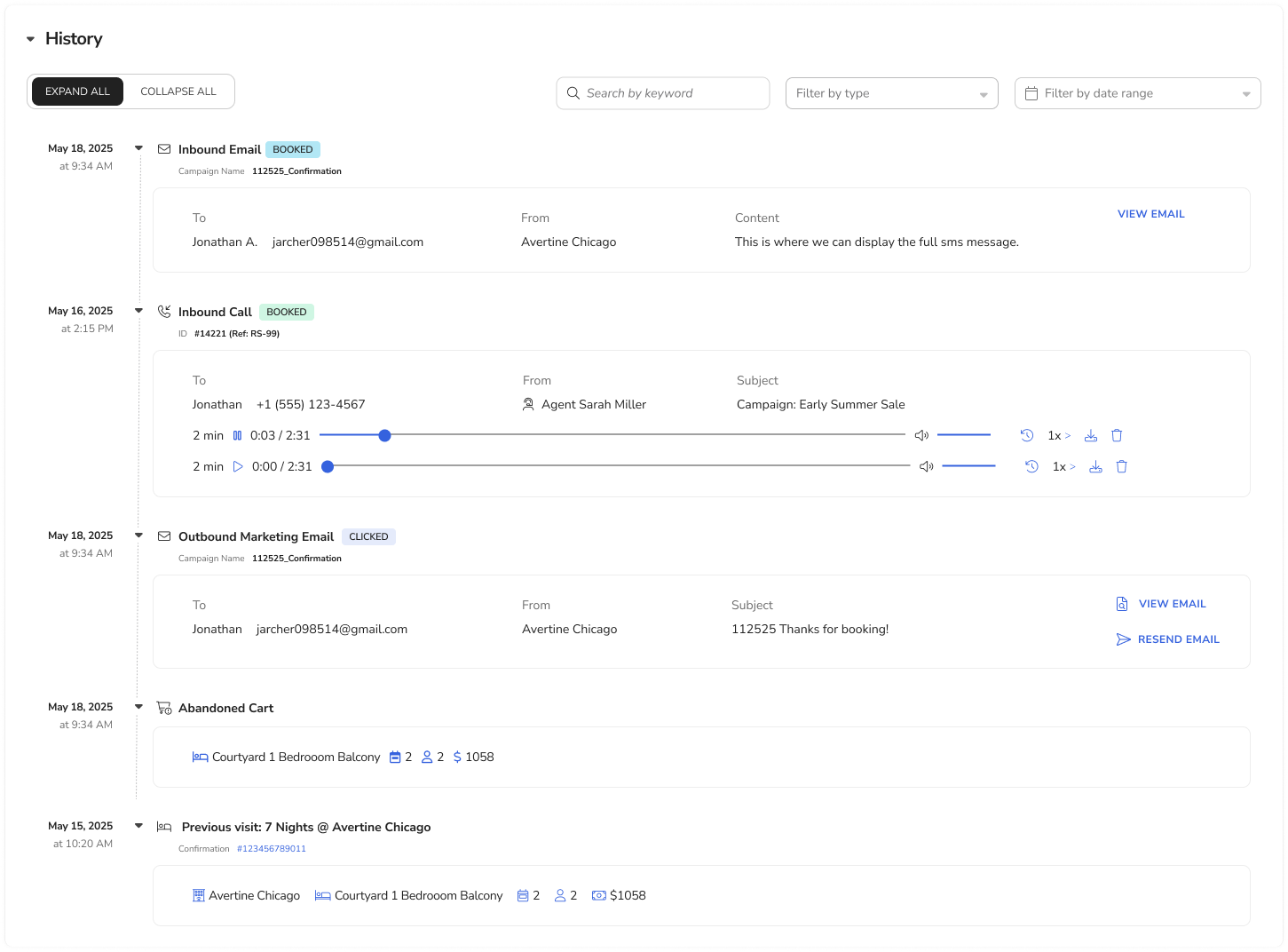
The history view brings calls, emails, abandoned carts, and past stays into a searchable timeline. Agents can expand an event to inspect its details or access a recording, with filters for interaction type and date range. This keeps the history of the relationship close to the current lead.
Validate workflows across real operational variation
We tested hundreds of scenarios across dozens of customer and call types, refining the experience along the way. The breadth mattered: a workflow that holds up in one straightforward reservation can still break down when the customer, configuration, or call context changes.
Plan the transition in manageable steps
The transition approach separates functionality into progressive releases across multiple quarters, reducing the need to introduce six to eight major changes at once.
Make automated assessment inspectable
In the existing manual review process, supervisors selected roughly five to ten recordings per agent each month, then listened and scored them against company guidelines. The time required limited how many conversations they could assess.
The new AI experience is designed to analyze and score recordings, surface results to agents, and help supervisors identify performance that falls outside configured guidelines or risks missing a target. These are intended capabilities of the unreleased experience.
Keep the evidence close to the score
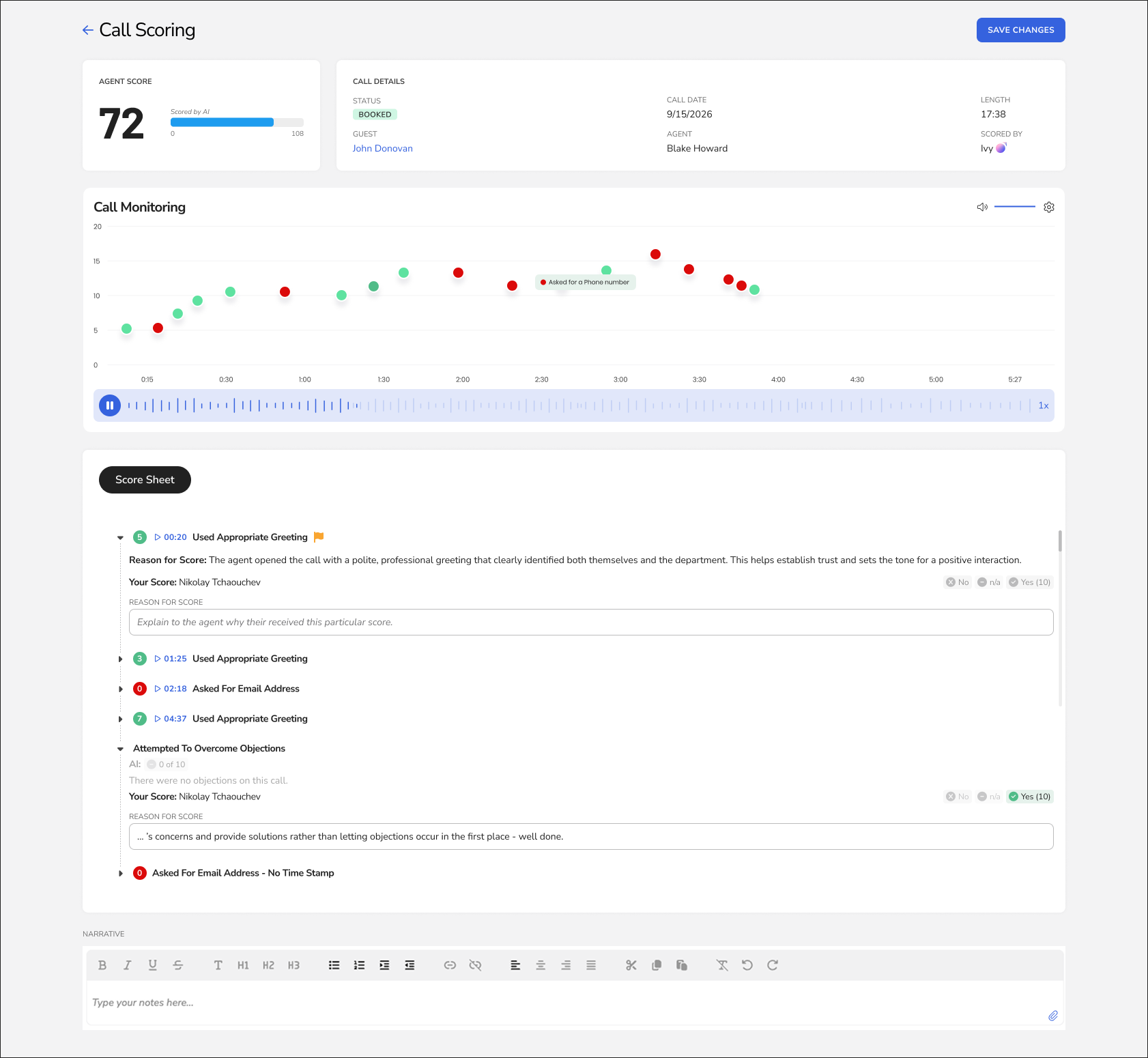
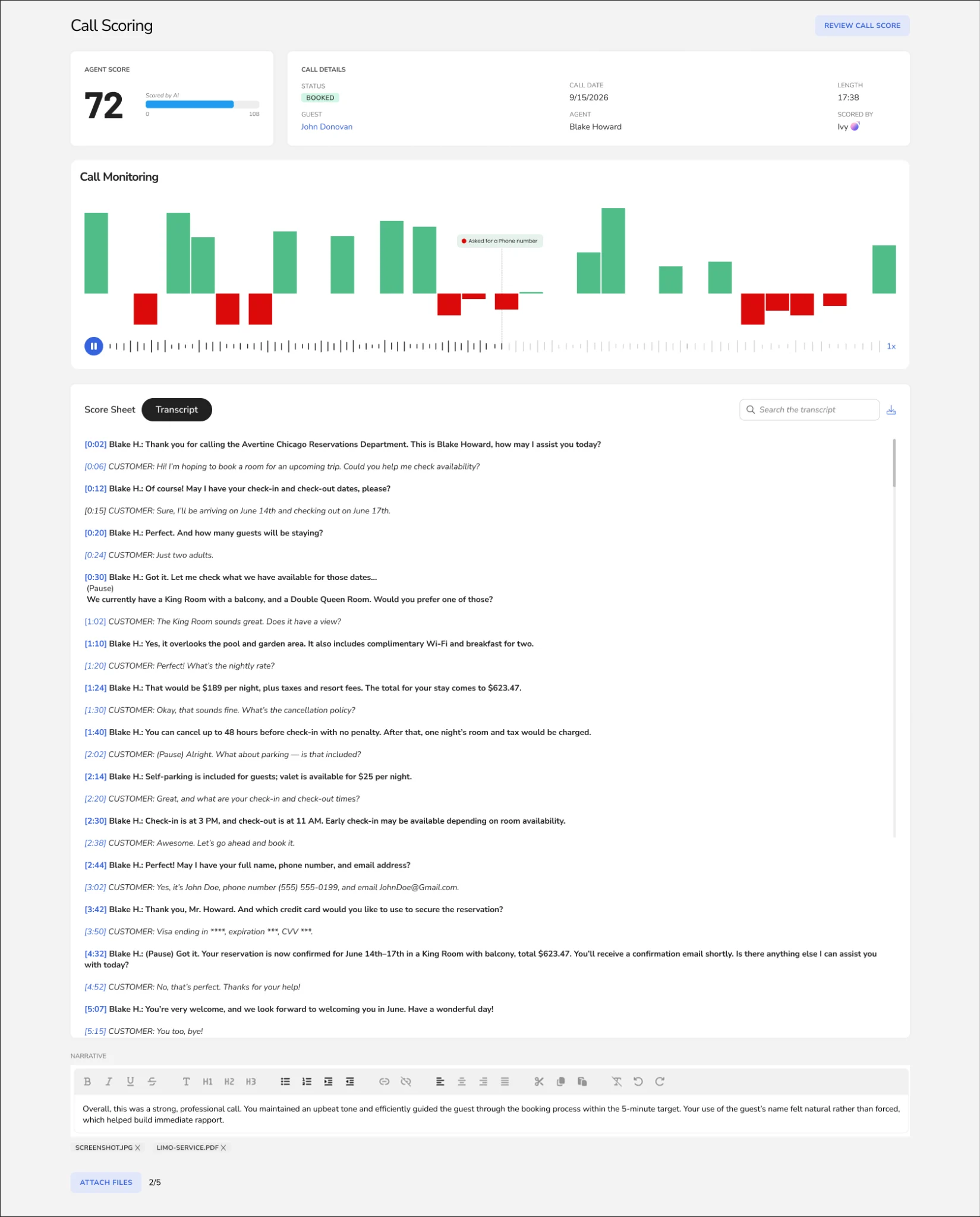
A score alone gives a supervisor little basis for coaching or judging an assessment. The review interface connects scores to the recording, timestamped criteria, explanations, and transcript, so the reviewer can move from an assessment to the conversation behind it.
Human review controls let supervisors inspect the automated assessment and add their own evaluation. The design keeps their judgment within the workflow rather than treating an AI score as the end of the review process.
Connect individual reviews to coaching patterns
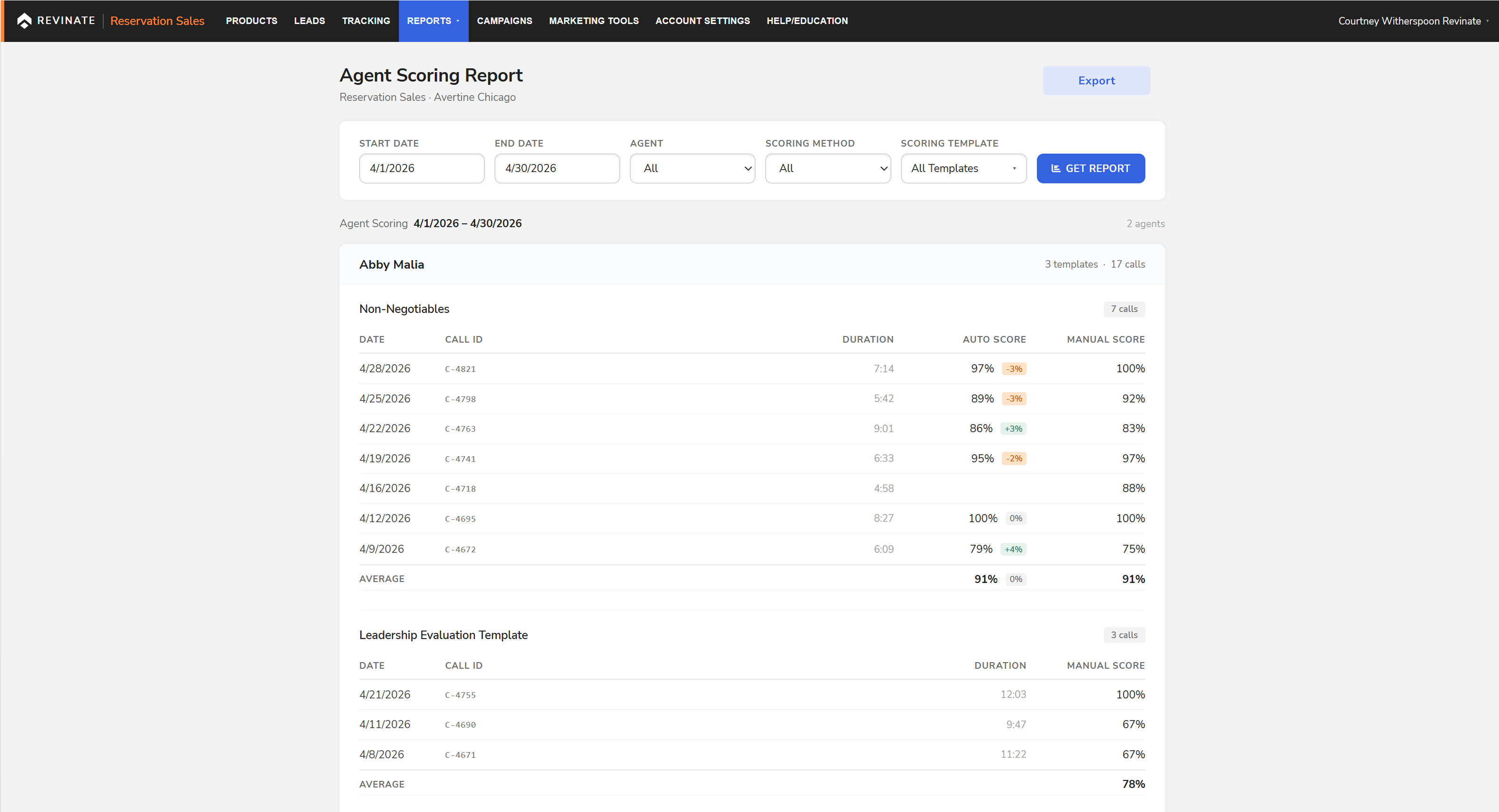
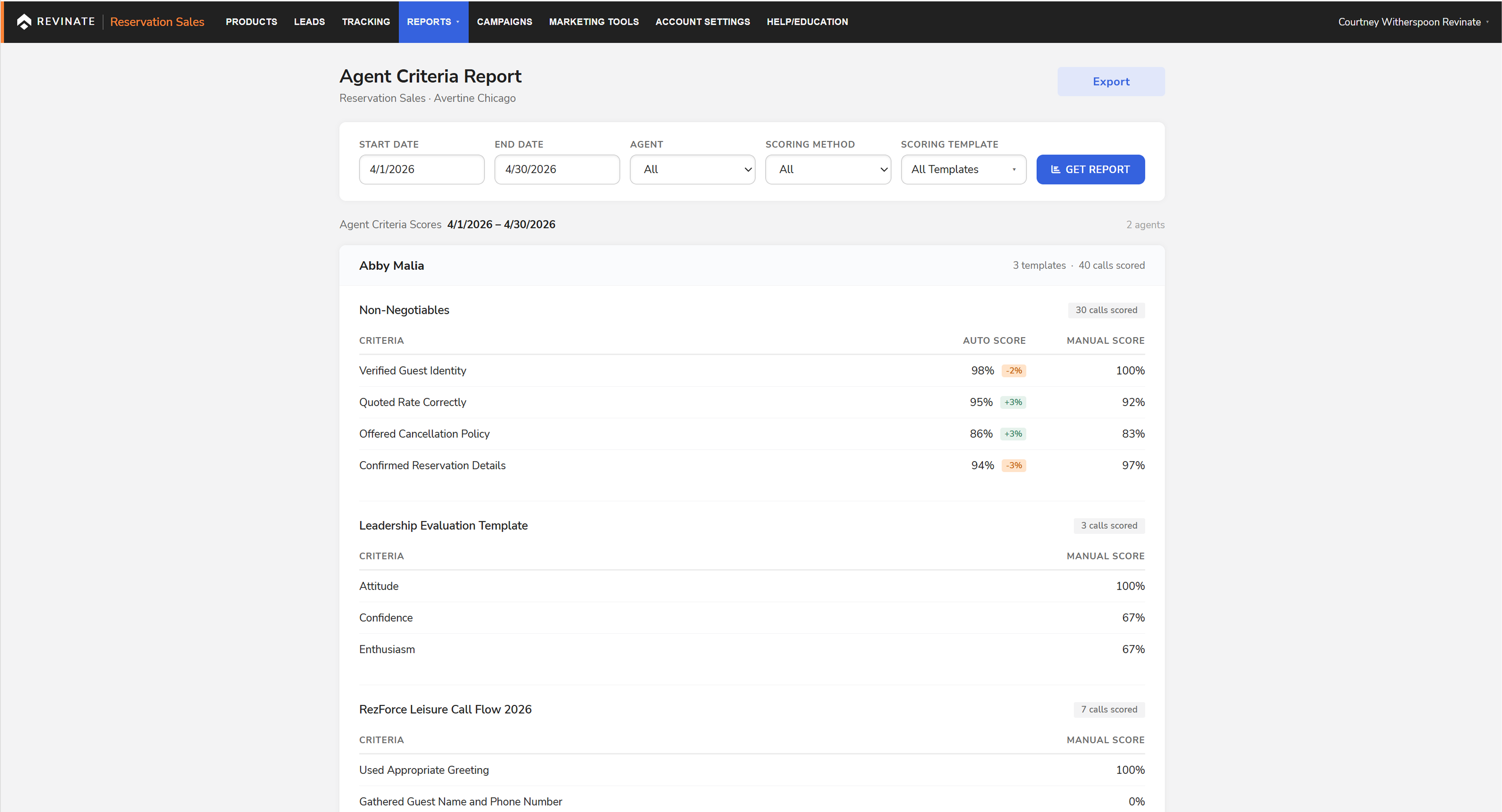
The reporting designs provide two ways to examine performance: by individual call and by scoring criterion. Both include filters for date range, agent, scoring method, and template, keeping the context of the comparison visible.
Compare automated and manual assessments
The Agent Scoring Report groups calls by agent and template, placing automated and manual scores side by side and showing differences where both are available. This makes disagreement visible for further review instead of hiding it behind an overall average.
Find the behaviors that need attention
The Agent Criteria Report aggregates scores by criterion within each template. It gives supervisors a more specific view of behaviors such as verifying guest identity or explaining a cancellation policy, supporting a conversation about what to coach next.
Connect review coverage to usage and business value
Automating analysis also introduces a commercial decision: which calls should a team process, and how much usage will that generate? I brought call selection, eligibility, and usage visibility together in the batch-scoring experience to support that decision.
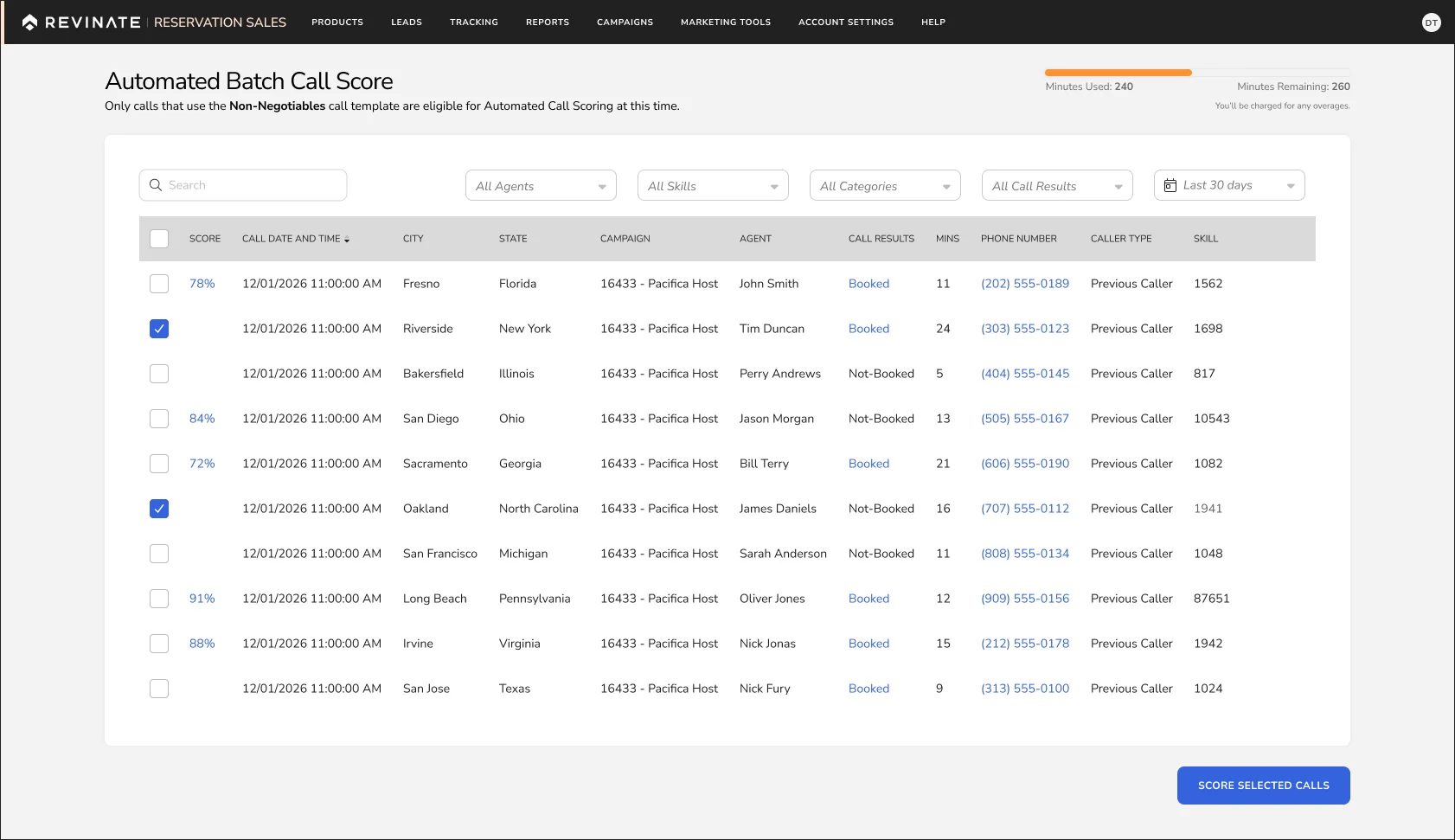
The proposed experience supports usage-based monetization and performance reporting that estimates revenue opportunity by comparing lower-performing agents with average conversion rates. That estimate is a way to prioritize coaching, rather than a promise of recovered revenue.
The intended value is broader review coverage and better-directed coaching. Whether that translates into less review effort or stronger conversion needs to be evaluated after launch.
A design foundation, with launch outcomes still ahead
The work brings a platform rewrite, group hierarchy, permissions, settings, templates, reporting, and AI call review into one design direction. My contribution was maintaining coherence across that scope while product ownership changed and the requirements continued to evolve.
- For agents: a configurable workspace designed to preserve access to critical information during calls.
- For supervisors: a review experience that connects automated assessments with evidence and human evaluation.
- For the business: a foundation for group-level operations and usage-based AI capabilities.
Post-launch evaluation should look at agent task completion and adoption, supervisor review time, assessment coverage, and how often reviewers disagree with automated scores. Those measures would help distinguish a successful technical migration from a product that improves the work.
Modernization depends on continuity
The central design judgment was deciding what to preserve and where to introduce change. Agents needed flexibility and familiar operational capabilities. Supervisors needed a way to inspect a new kind of assessment. The organization needed an experience that could remain coherent across a long development cycle.
This project connects the parts of enterprise design I care most about: understanding complex workflows, working through technical constraints, and making new capabilities usable within an existing operation.